Source: http://bradhedlund.com/2009/04/05/top-of-rack-vs-end-of-row-data-center-designs/
This article provides a close examination and comparison of two popular data center physical designs, “Top of Rack”, and “End of Row”. We will also explore a new alternative design using Fabric Extenders, and finish off with a quick look at how Cisco Unified Computing might fit into this picture. Lets get started!
Top of Rack Design
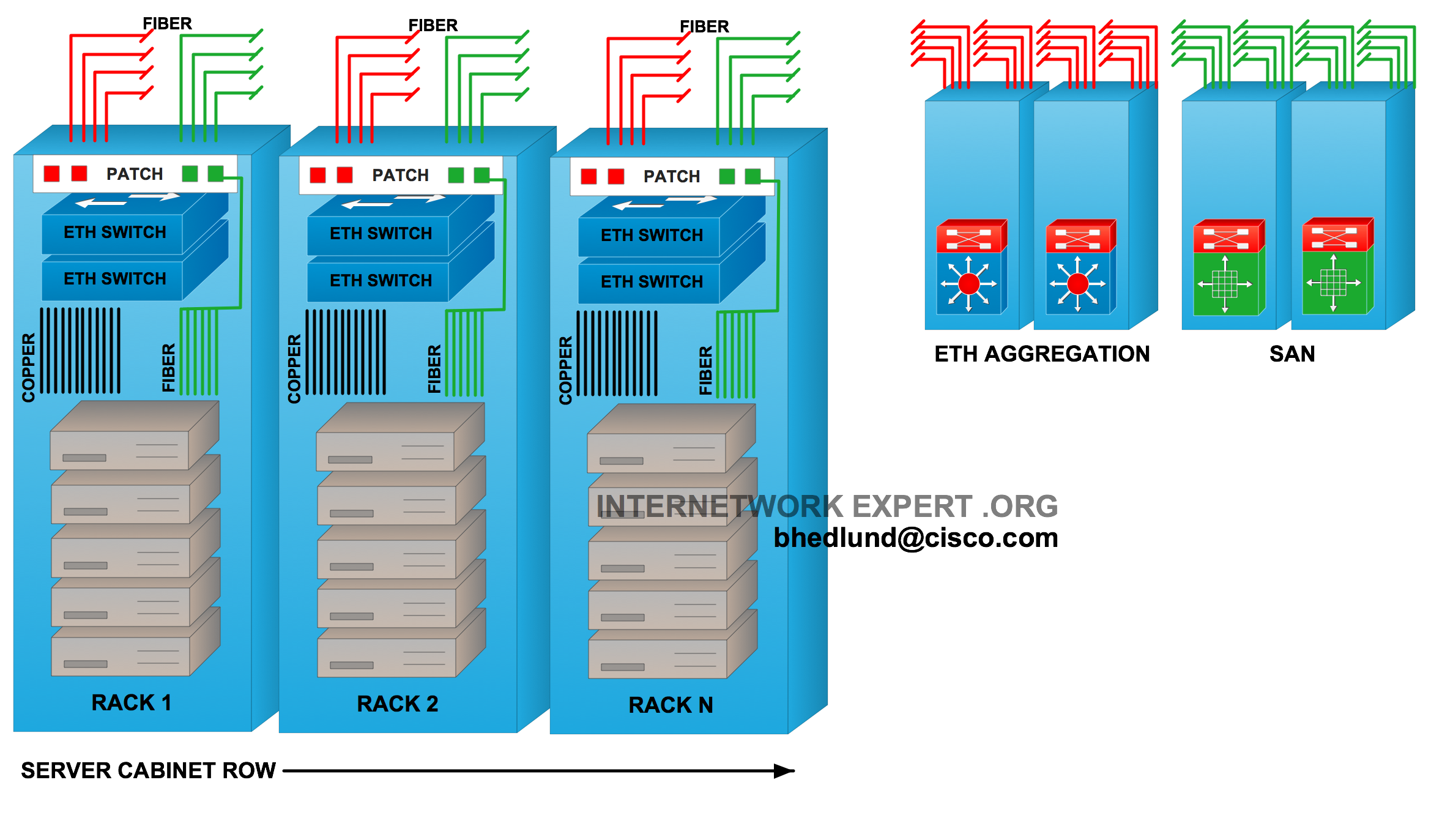
Figure 1 - Top of Rack design
In the Top of Rack design servers connect to one or two Ethernet switches installed inside the rack. The term “top of rack” has been coined for this design however the actual physical location of the switch does not necessarily need to be at the top of the rack. Other switch locations could be bottom of the rack or middle of rack, however top of the rack is most common due to easier accessibility and cleaner cable management. This design may also sometimes be referred to as “In-Rack”. The Ethernet top of rack switch is typically low profile (1RU-2RU) and fixed configuration. The key characteristic and appeal of the Top of Rack design is that all copper cabling for servers stays within the rack as relatively short RJ45 patch cables from the server to the rack switch. The Ethernet switch links the rack to the data center network with fiber running directly from the rack to a common aggregation area connecting to redundant “Distribution” or “Aggregation” high density modular Ethernet switches.
Each rack is connected to the data center with fiber. Therefore, there is no need for a bulky and expensive infrastructure of copper cabling running between racks and throughout the data center. Large amounts of copper cabling places an additional burden on data center facilities as bulky copper cable can be difficult to route, can obstruct airflow, and generally requires more racks and infrastructure dedicated to just patching and cable management. Long runs of twisted pair copper cabling can also place limitations on server access speeds and network technology. The Top of Rack data center design avoids these issues as there is no need to for a large copper cabling infrastructure. This is often the key factor why a Top of Rack design is selected over End of Row.
Each rack can be treated and managed like an individual and modular unit within the data center. It is very easy change out or upgrade the server access technology rack-by-rack. Any network upgrades or issues with the rack switches will generally only affect the servers within that rack, not an entire row of servers. Given that the server connects with very short copper cables within the rack, there is more flexibility and options in terms of what that cable is and how fast of a connection it can support. For example, a 10GBASE-CX1 copper cable could be used to provide a low cost, low power, 10 gigabit server connection. The 10GBASE-CX1 cable supports distances of up to 7 meters, which works fine for a Top of Rack design.
Fiber to each rack provides much better flexibility and investment protection than copper because of the unique ability of fiber to carry higher bandwidth signals at longer distances. Future transitions to 40 gigabit and 100 gigabit network connectivity will be easily supported on a fiber infrastructure. Given the current power challenges of 10 Gigabit over twisted pair copper (10GBASE-T), any future support of 40 or 100 Gigabit on twisted pair will likely have very short distance limitations (in-rack distances). This too is another key factor why Top of Rack would be selected over End of Row.

Figure 2 - Blade enclosures with integrated Ethernet and FC switching
The adoption of blade servers with integrated switch modules has made fiber connected racks more popular by moving the “Top of Rack” concept inside the blade enclosure itself. A blade server enclosure may contain 2, 4, or more ethernet switching modules, multiple FC switches, resulting in an increasing number of switches to manage.
One significant draw back of the Top of Rack design is the increased management domain with each rack switch being a unique control plane instance that must be managed. In a large data center with many racks, a Top of Rack design can quickly become a management burden by adding many switches to the data center that are each individually managed. For example, in a data center with 40 racks, where each rack contained (2) “Top of Rack” switches, the result would be 80 switches on the floor just providing server access connections (not counting distribution and core switches). That is 80 copies of switch software that need to be updated, 80 configuration files that need to be created and archived, 80 different switches participating in the Layer 2 spanning tree topology, 80 different places a configuration can go wrong. When a Top of Rack switch fails the individual replacing the switch needs to know how to properly access and replace the archived configuration of the failed switch (assuming it was correctly and recently archived). The individual may also be required to perform some verification testing and trouble shooting. This requires a higher skill set individual who may not always be available (or if so comes at a high price), especially in a remotely hosted “lights out” facility.
The top of rack design typically also requires higher port densities in the Aggregation switches. Going back to the 80 switch example, with each switch having a single connection to each redundant Aggregation switch, each Aggregation switch requires 80 ports. The more ports you have in the aggregation switches, the more likely you are to face potential scalability constraints. One of these constraints might be, for example, STP Logical Ports, which is a product of aggregation ports and VLANs. For example, if I needed to support 100 VLANs in single L2 domain with PVST on all 80 ports of the aggregation switches, that would result in 8000 STP Logical Ports per aggregation switch. Most robust modular switches can handle this number. For example, the Catalyst 6500 supports 10,000 PVST instances in total, and 1800 per line card. And the Nexus 7000 supports 16,000 PVST instances globally with no per line card restrictions. None the less, this is something that will need to be payed attention to as the data center grows in numbers of ports and VLANs. Another possible scalability constraint is raw physical ports – does the aggregation switch have enough capacity to support all of the top of rack switches? What about support for 10 Gigabit connections to each top of rack switch, how well does the aggregation switch scale in 10 gigabit ports?
Summary of Top of Rack advantages (Pro’s):
- Copper stays “In Rack”. No large copper cabling infrastructure required.
- Lower cabling costs. Less infrastructure dedicated to cabling and patching. Cleaner cable management.
- Modular and flexible “per rack” architecture. Easy “per rack” upgrades/changes.
- Future proofed fiber infrastructure, sustaining transitions to 40G and 100G.
- Short copper cabling to servers allows for low power, low cost 1oGE (10GBASE-CX1), 40G in the future.
- Ready for Unified Fabric today.
Summary of Top of Rack disadvantages (Con’s):
- More switches to manage. More ports required in the aggregation.
- Potential scalability concerns (STP Logical ports, aggregation switch density).
- More Layer 2 server-to-server traffic in the aggregation.
- Racks connected at Layer 2. More STP instances to manage.
- Unique control plane per 48-ports (per switch), higher skill set needed for switch replacement.
End of Row Design

Figure 3 - End of Row design
Server cabinets (or racks) are typically lined up side by side in a row. Each row might contain, for example, 12 server cabinets. The term “End of Row” was coined to describe a rack or cabinet placed at either end of the “server row” for the purpose of providing network connectivity to the servers within that row. Each server cabinet in this design has a bundle of twisted pair copper cabling (typically Category 6 or 6A) containing as many as 48 (or more) individual cables routed to the “End of Row”. The “End of Row” network racks may not necessarily be located at the end of each actual row. There may be designs where a handful of network racks are placed in a small row of their own collectively providing “End of Row” copper connectivity to more than one row of servers.
For a redundant design there might be two bundles of copper to each rack, each running to opposite “End of Row” network racks. Within the server cabinet the bundle of copper is typically wired to one or more patch panels fixed to the top of the cabinet. The individual servers use a relatively short RJ45 copper patch cable to connect from the server to the patch panel in the rack. The bundle of copper from each rack can be routed through over head cable troughs or “ladder racks” that carry the dense copper bundles to the “End of Row” network racks. Copper bundles can also be routed underneath a raised floor, at the expense of obstructing cool air flow. Depending on how much copper is required, it is common to have a rack dedicated to patching all of the copper cable adjacent to the rack that contains the “End of Row” network switch. Therefore, there might be two network racks at each end of the row, one for patching, and one for the network switch itself. Again, an RJ45 patch cable is used to link a port on the network switch to a corresponding patch panel port that establishes the link to the server. The large quantity of RJ45 patch cables at the End of Row can cause a cable management problem and without careful planning can quickly result in an ugly unmanageable mess.
Another variation of this design can be referred to as “Middle of Row” which involves routing the copper cable from each server rack to a pair of racks positioned next to each other in the middle of the row. This approach reduces the extreme cable lengths from the far end server cabinets, however potentially exposes the entire row to a localized disaster at the “Middle of Row” (such as leaking water from the ceiling) that might disrupt both server access switches at the same time.

Figure 4 - Middle of Row variation of End of Row
The End of Row network switch is typically a modular chassis based platform that supports hundreds of server connections. Typically there are redundant supervisor engines, power supplies, and overall better high availability characteristics than typically found in a “Top of Rack” switch. The modular End of Row switch is expected to have a longer life span of at least 5 to 7 years (or even longer). It is uncommon for the end of row switch to be frequently replaced, once its in – “it’s in” – and any further upgrades are usually component level upgrades such as new line cards or supervisor engines.
The End of Row switch provides connectivity to the hundreds of servers within that row. Therefore, unlike Top of Rack where each rack is its own managed unit, with End of Row the entire row of servers is treated like one holistic unit or “Pod” within the data center. Network upgrades or issues at the End of Row switch can be service impacting to the entire row of servers. The data center network in this design is managed “per row”, rather than “per rack”.
A Top of Rack design extends the Layer 2 topology from the aggregation switch to each individual rack resulting in an overall larger Layer 2 footprint, and consequently a larger Spanning Tree topology. The End of Row design, on the other hand, extends a Layer 1 cabling topology from the “End of Row” switch to each rack, resulting in smaller and more manageable Layer 2 footprint and fewer STP nodes in the topology.
End of Row is a “per row” management model in terms of the data center cabling. Furthermore, End of Row is also “per row” in terms of the network management model. Given there are usually two modular switches “per row” of servers, the result of this is far few switches to manage when compared to a Top of Rack design. In my previous example of 40 racks, lets say there are 10 racks per row, which would be 4 rows each with two “End of Row” switches. The result is 8 switches to manage, rather than 80 in the Top of Rack design. As you can see, the End of Row design typically carries an order of magnitude advantage over Top of Rack in terms of the number of individual switches requiring management. This is often a key factor why the End of Row design is selected over Top of Rack.
While End of Row has far less switches in the infrastructure, this doesn’t necessarily equate to far less capital costs for networking. For example, the cost of a 48-port line card in a modular end of row switch can be only slightly less in price (if not similar) to an equivalent 48-port “Top of Rack” switch. However, maintenance contract costs are typically less with End of Row due to the far fewer number of individual switches carrying maintenance contracts.
As was stated in the Top of Rack discussion, the large quantity of dense copper cabling required with End of Row is typically expensive to install, bulky, restrictive to air flow, and brings its share of cable management headaches. The lengthy twisted pair copper cable poses a challenge for adopting higher speed server network I/O. For example, a 10 gigabit server connection over twisted pair copper cable (10GBASE-T) is challenging today due to the current power requirements of the 10GBASE-T silicon currently available (6-8W per end). As a result there is also scarce availability of dense and cost effective 10GBASE-T network switch ports. As the adoption of dense compute platforms and virtualization quickly accelerates, servers limited to 1GE network I/O connections will pose a challenge in obtaining the wider scale consolidation and virtualization capable in modern servers. Furthermore, adopting a unified fabric will also have to wait until 10GBASE-T unified fabric switch ports and CNA’s are available (not expected until late 2010).
10GBASE-T silicon will eventually (over the next 24 months) reach lower power levels and switch vendors (such as Cisco) will have dense 10GBASE-T line cards for modular switches (such as Nexus 7000). Server manufactures will also start shipping triple speed 10GBASE-T LOM’s (LAN on Motherboard) – 100/1000/10G, and NIC/HBA vendors will have unified fabric CNA’s with 10GBASE-T ports. All of this is expected to work on existing Category 6A copper cable. All bets are off however for 40G and beyond.
Summary of End of Row advantages (Pro’s):
- Fewer switches to manage. Potentially lower switch costs, lower maintenance costs.
- Fewer ports required in the aggregation.
- Racks connected at Layer 1. Fewer STP instances to manage (per row, rather than per rack).
- Longer life, high availability, modular platform for server access.
- Unique control plane per hundreds of ports (per modular switch), lower skill set required to replace a 48-port line card, versus replacing a 48-port switch.
Summary of End of Row disadvantages (Con’s):
- Requires an expensive, bulky, rigid, copper cabling infrastructure. Fraught with cable management challenges.
- More infrastructure required for patching and cable management.
- Long twisted pair copper cabling limits the adoption of lower power higher speed server I/O.
- More future challenged than future proof.
- Less flexible “per row” architecture. Platform upgrades/changes affect entire row.
- Unified Fabric not a reality until late 2010.
Top of Rack Fabric Extender

Figure 5 - Fabric Extenders provide the End of Row management model in a Top of Rack design
The fabric extender is a new data center design concept that allows the for the “Top of Rack” placement of server access ports as a Layer 1 extension of an upstream master switch. Much like a line card in a modular switch, the fabric extender is a data plane only device that receives all of its control plane intelligence from it’s master switch. The relationship between a fabric extender and it’s master switch is similar to the relationship between a line card and it’s supervisor engine, only now the fabric extender can be connected to its master switch (supervisor engine) with remote fiber connections. This allows you to effectively decouple the line cards of the modular “End of Row” switch and spread them throughout the data center (at the top of the rack), all without loosing the management model of a single “End of Row” switch. The master switch and all if its remotely connected fabric extenders are managed as one switch. Each fabric extender is simply providing a remote extension of ports (acting like a remote line card) to the single master switch.
Unlike a traditional Top of Rack switch, the top of rack fabric extender is not an individually managed switch. There is no configuration file, no IP address, and no software that needs to be managed for each fabric extender. Furthermore, there is no Layer 2 topology from the fabric extender to it’s master switch, rather it’s all Layer 1. Consequently, there is no Spanning Tree topology between the master switch and it’s fabric extenders, much like there is no Spanning Tree topology between a supervisor engine and it’s line cards. The Layer 2 Spanning Tree topology only exists between the master switch and the upstream aggregation switch it’s connected to.
The fabric extender design provides the physical topology of “Top of Rack”, with the logical topology of “End of Row”, providing the best of both designs. There are far fewer switches to manage (much like End of Row) with no requirement for a large copper cabling infrastructure, and future proofed fiber connectivity to each rack.
There is a cost advantage as well. Given that the fabric extender does not need the CPU, memory, and flash storage to run a control plane, there are less components and therefore less cost. A fabric extender is roughly 33% less expensive than an equivalent Top of Rack switch.
When a fabric extender fails there is no configuration file that needs to be retrieved and replaced, no software that needs to be loaded. The failed fabric extender simply needs to be removed and a new one installed in its place connected to the same cables. The skill set required for the replacement is somebody who knows how to use a screwdriver, can unplug and plug in cables, and can watch a status light turn green. The new fabric extender will receive its configuration and software from the master switch once connected.

Figure 6 - Top of Rack Fabric Extender linked to Master switch in Aggregation area
In the design above show in Figure 6, top of rack fabric extenders use fiber from the rack to connect to their master switch (Nexus 5000) somewhere in the aggregation area. The Nexus 5000 links to the Ethernet aggregation switch like any normal “End of Row” switch.
Note: Up to (12) fabric extenders can be managed by a single master switch (Nexus 5000).
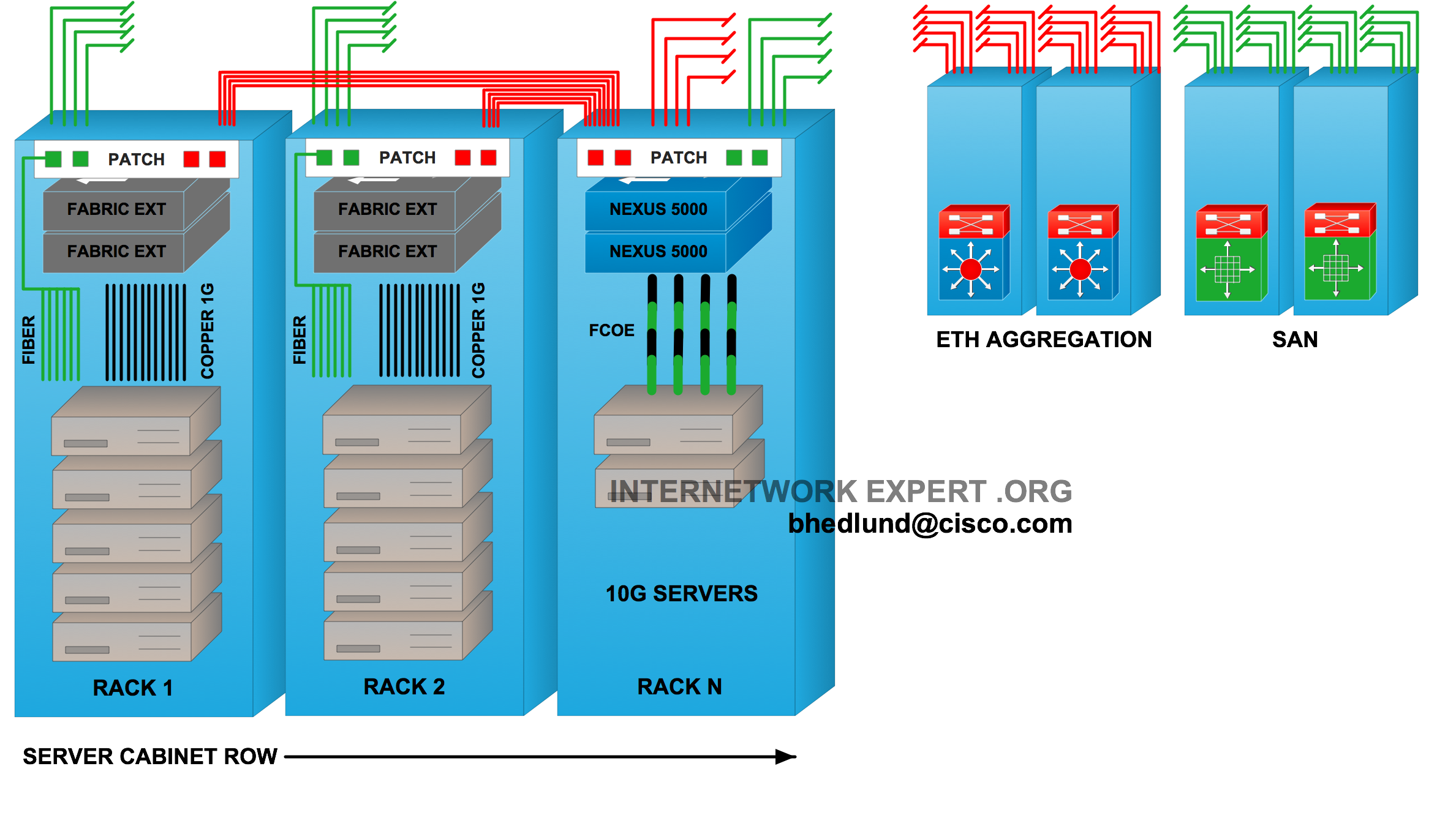
Figure 7 - Top of Rack Fabric Extender linked to End of Row master switch
In Figure 7 above the top of rack fabric extenders use fiber running from the rack to an “End of Row” cabinet containing the master switch. The master switch, in this case a Nexus 5000, can also provide 10GE unified fabric server access connections.
It is more common for fiber to run from the rack to a central aggregation area (as show in Figure 6). However the design shown above in Figure 7 where fiber also runs to the end of a row may start to gain interest with fabric extender deployments as a way to preserve the logical grouping of “rows” by physically placing the master switch within the row of the fabric extenders linked to it.
Summary of Top of Rack Fabric Extender advantages (Pro’s):
- Fewer switches to manage. Fewer ports required in the aggregation area. (End of Row)
- Racks connected at Layer 1 via fiber, extending Layer 1 copper to servers in-rack. Fewer STP instances to manage. (End of Row)
- Unique control plane per hundreds of ports, lower skill set required for replacement. (End of Row)
- Copper stays “In Rack”. No large copper cabling infrastructure required. (Top of Rack)
- Lower cabling costs. Less infrastructure dedicated to cabling and patching. Cleaner cable management. (Top of Rack)
- Modular and flexible “per rack” architecture. Easy “per rack” upgrades/changes. (Top of Rack)
- Future proofed fiber infrastructure, sustaining transitions to 40G and 100G. (Top of Rack)
- Short copper cabling to servers allows for low power, low cost 1oGE (10GBASE-CX1), 40G in the future. (Top of Rack)
Summary of Top of Rack Fabric Extender disadvantages (Con’s):
- New design concept only available sine January 2009. Not a widely deployed design, yet.
Cisco Unified Computing Pods
The Cisco Unified Computing solution provides a tightly coupled architecture of blade servers, unified fabric, fabric extenders, and embedded management all within a single cohesive system. A multi-rack deployment is a single system managed by a redundant pair of “Top of Rack” fabric interconnect switches providing the embedded device level management, provisioning, and linking the pod to the data center aggregation Ethernet and Fibre Channel switches.

Above, a pod of 3 racks makes up one system. Each blade enclosure links with a unified fabric — fabric extender — to the fabric interconnect switches with 10GBASE-CX1 or USR 10GE fiber optics (ultra short reach).
A single Unified Computing System can contain as many as 40 blade enclosures as one system. With such scalability there could be designs where an entire row of blade enclosures is linked to the “End of Row” or “Middle of Row” fabric interconnects. As shown below…

Figure 9 - Unified Computing System Row
These are not the only possible designs, rather just a couple of simple examples. Many more possibilities exist as the architecture is as flexible as it is scalable.
Summary of Unified Computing Systems advantages (Pro’s):
- Leverages the “Top of Rack” physical design.
- Leverages Fabric Extender technology. Fewer points of management.
- Single system of compute, unified fabric, and embedded management.
- Highly scalable as a single system.
- Optimized for virtualization.
Summary of Unified Computing System disadvantages (Con’s):
- Cisco UCS is not available yet.
Ask your local Cisco representative for more information.
- UPDATE: Cisco UCS has been available and shipping to customers since June 2009

Deploying Data Center designs into “Pods”
Choosing “Top of Rack” or “End of Row” physical designs is not an all or nothing deal. The one thing all of the above designs have in common is that they each link to a common Aggregation area with fiber. The common Aggregation area can therefore service the “End of Row” pod area no differently than a “Top of Rack” pod. This allows for flexibility in the design choices made as the data center grows, Pod by Pod. Some pods may employ End of Row copper cabling, while another pod may employ top of rack fiber, with each pod linking to the common aggregation area with fiber.

Figure 10 - Data Center Pods
Conclusion
This article is based on a 30+ slide detailed presentation I developed from scratch for Cisco covering data center physical designs, Top of Rack vs. End of Row. If you would like to see the entire presentation with a one-on-one discussion about your specific environment, please contact your local Cisco representative and ask to see “Brad Hedlund’s Top of Rack vs. End of Row data center designs” presentation! What can I say, a shameless attempt at self promotion. 
-Brad Hedlund
© INTERNETWORK EXPERT .ORG – 2009

